
On November 16, 2026, visitors to some of the most trusted websites in the world did everything right. They typed the address correctly. They were on the real BBC, the real CNN, the real Zoom. Nobody clicked a phishing link. Nobody downloaded anything strange.
The sites themselves served the malware.
Attackers exploited a vulnerability in Optimizely, the experimentation platform businesses use to test pages and conversions. They injected malicious JavaScript into customer projects, served from Optimizely's own content delivery network, alongside the legitimate script site owners trusted. Security firm Report URI detected the campaign, now tracked as OPTIMJACK.
At least 178 organizations were affected, including BBC, CNN, Zoom, HSBC, IKEA, Salesforce, GitLab, Equifax, Ledger, and KLM. Roughly 34 million page visits loaded the poisoned code on November 16. Not to sketchy corners of the internet. To household names.
Nobody breached 178 companies. They breached one vendor.
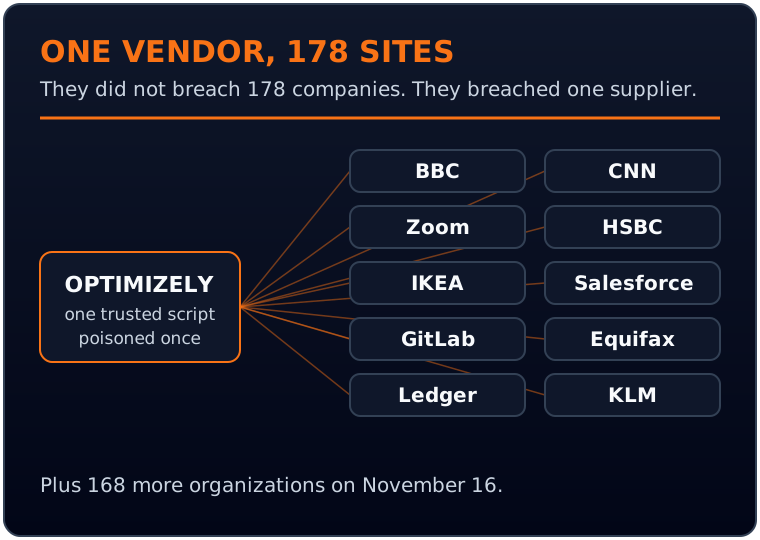
The attackers did not break into 178 companies one at a time. They broke into one trusted supplier and rode its script into every customer at once. The code swapped cryptocurrency wallet addresses so payments went to the attackers.
It skimmed payment card details from checkout flows. It stole browser cookies, took screenshots of pages, and pushed iOS exploit kits, named Coruna and DarkSword, to iPhone and iPad visitors.
By November 17, researchers had traced only about $7,151 in stolen cryptocurrency to the operation. That small number misleads. Card theft is much harder to measure from the outside, and skimmed cards can surface weeks later.
Optimizely said it identified the incident on November 16, removed the injected code, revoked tokens, reset affected accounts, and notified customers. The vendor responded. The exposure still happened.
Now translate this to a normal business website. Yours.
Your marketing stack is executable code from strangers
Open your homepage and count what loads. An analytics tag. A tag manager that can inject almost anything. A chat widget picked three years ago. A heatmap tool. A reviews badge. A pop-up tool from last Black Friday. An experimentation platform. Two pixels from ad platforms you no longer advertise on.
Every one is JavaScript from another company, running inside your pages, with access to whatever your visitors type and see. On a checkout page, that includes card numbers.

Every tag is code from another company, running inside your pages.
Owners tend to think of these tools as decorations. They are code running on your domain, under your reputation. When a customer gets skimmed on your site, the customer blames you. Their bank blames you. The regulator who comes asking will ask you.
We audit websites for a living, and the pattern is consistent: nobody on the team can produce a complete list of the scripts running on their own site. Scripts accumulate. A contractor adds one during a redesign. An agency adds one for a campaign long ended. A plugin quietly loads two more.
That gap between what you think is running and what is actually running is the attack surface. OPTIMJACK proved, at the largest possible scale, what that gap is worth to an attacker.
Three things to take from this week
Why testing tools sit at the top of the risk pile
Not all third-party scripts carry equal risk. A static reviews badge that loads a fixed file is one thing. An experimentation platform is another.
Experimentation tools work by changing what a visitor sees. They swap headlines, move buttons, inject offers, and rewrite page elements on the fly. By design, the tool has deep access to your page and no fixed version you approved. Incident responders made the point bluntly: tools like this are effectively code injectors with no version pinning.
The script you approved in January is not necessarily the one running in November. It changes constantly, by design. Compromise the vendor, and every change reaches millions of browsers that already trust it.
The standard defenses have limits worth knowing. Subresource integrity, or SRI, lets a browser verify that a script matches a known fingerprint. That works for a static file. It is largely unrealistic for dynamic vendor scripts, because the fingerprint breaks with every vendor change.
A strict content security policy can restrict which domains your pages load code from. It genuinely helps, and it can also break your site if switched on carelessly. The practical path is report-only mode first, covered below.
What to do this week
Not a six-month security program. A short list a business owner or marketing lead can start now.
1. Inventory every third-party script and tag on your site. Crawl your key pages: homepage, lead forms, booking flows, checkout. List every external domain your pages load code from. Tag managers count double, because one container can load a dozen tools. If a script appears and nobody can say what it does, that is a finding, not a footnote.
2. Remove what is unused. Every audit finds dead tools: the pixel for the ad platform you quit, the heatmap from a one-time study, the chat widget from the vendor you replaced. Dead scripts still run and still sit inside your checkout page. Removal is the cheapest security control that exists, and it usually makes the site faster.
3. Ask your vendors three questions. How do you sign and version the script you serve to our site? How would we know if it changed unexpectedly? What did you do after November 16 to check your own platform? A serious vendor answers plainly. Evasiveness is an answer too.
4. Restrict what can run on payment and form pages. Checkout should load the smallest possible set of scripts. If a tool does not need to be on the payment page, get it off. Then set up a content security policy in report-only mode. Report-only blocks nothing. It reports what your pages try to load, so you see the real list before enforcing anything.
On a checkout page, third-party code can see card numbers. Keep that list shortest of all.
5. If you run Optimizely, review what loaded on November 16. Check with your provider or your logs whether your projects served the injected code that day, and treat November 16 traffic to payment and form pages as exposed until you know otherwise.
Watch card and crypto payment flows in the coming weeks for chargebacks, failed payments, and customer complaints. Skimmed data often surfaces slowly.
6. Assign an owner. Not a committee. One named person who owns the script inventory, reviews it quarterly, and approves additions. Most script sprawl is not malice. It is the absence of a person whose job is to say no.
Your customers cannot tell your code from a vendor's code. Neither can their bank. That is why the inventory is your job, not your vendor's.
The second fire burning in the same week
OPTIMJACK was not the only lesson this week. Between November 12 and 17, a wave of outages hit Microsoft services, the FAA, major banks, United Airlines, Apple, and the NSA.
The Washington Sun reported that bank executives and NSA officials told members of Congress that rushed patching of AI-found vulnerabilities overwhelmed systems. The NSA's own statement described its November 17 network failure as a temporary degradation during scheduled maintenance.
The thread that connects to your website: in October, researchers disclosed two critical PHP flaws, nicknamed PHP2Shell, found with AI help. PHP powers roughly 70 percent of websites, including most WordPress sites. AI now finds serious vulnerabilities faster than teams can safely fix them, and rushed patches carry their own outage risk.
We wrote up the bigger picture on why AI is finding holes faster than anyone can patch them in a companion essay. The operator version is short: patching your own stack is no longer a quarterly chore.
WordPress core, themes, plugins, and the PHP version underneath them need a real cadence, tested on staging first, so the fix does not become your outage.
The trust math has changed
For years, the standard advice was to check the address bar, use reputable sites, and avoid strange links. November 16 broke that advice. The reputable sites were the delivery mechanism. Only the site owner could have reduced the damage in advance, by knowing what ran on the page and keeping the list short. Treat the vendors with code on your site the way you treat people with keys to your building. Short list. Current. Reviewed. Owned by somebody.
Frequently asked questions
The specific attack used Optimizely, but the mechanism works with any vendor script on your pages: analytics, tag managers, chat widgets, and heatmap tools all load third-party JavaScript the same way. If one of those vendors were compromised, their script on your site would carry the payload. The question is how many vendors have code on your pages, and whether anyone can list them.
Start with your tag manager, since containers there can load tools nobody remembers adding. Then list every external domain loading a script on your key pages, especially checkout and lead forms. Browser developer tools show this in the network tab, or an audit tool or your web provider can produce the list faster. The gap between the list you expected and the list you find is the work.
No. Analytics, testing, and support tools earn their place, and stripping everything would blind your marketing and break useful features. The goal is a short, deliberate list, not an empty one. Remove tools nobody uses, consolidate duplicates, and keep high-access tools like experimentation platforms off pages that handle payments and sensitive forms unless there is a strong reason.
It is a set of instructions your site sends to each visitor's browser, listing which domains may provide scripts for your pages. Anything not on the list gets blocked once the policy is enforced. Start in report-only mode, which blocks nothing and reports what your pages load. Run it until the reports look clean, then enforce. Switching straight to enforcement on a busy site is how teams break their own checkout on a Friday afternoon.
Contact your web provider and ask directly whether your Optimizely projects, or any vendor script, served injected code that day. Preserve logs from November 16 if you have them. Then watch the following weeks for chargebacks and reports of card misuse from customers who bought that day. If you collect payments and confirm exposure, talk to your payment processor early. They have seen this pattern and would rather hear from you first.