
Search your business on Google, on your phone, the way a customer would. Look at your profile. If a Book Online button is sitting there and you never set one up, you are not imagining it. Google may have added it for you.
Here is the direct answer, before the details. Click the button yourself this week. Find out where it goes. If it opens a real booking page, keep it and make it yours.
If it opens your contact form, replace the link with a page where someone can actually book. If it opens a dead page, remove the link until the destination works. A button that says Book Online is a promise. Right now, for some businesses, Google is making that promise on their behalf, and nobody checked whether it can be kept.
What showed up on Friday
The story broke on November 9, 2026, when Search Engine Roundtable reported that Google may be automatically adding booking links to some Business Profiles. The editor, Barry Schwartz, found one on his own listing. The day before, on Friday, three local search specialists had posted the same sighting on their own clients.
Brandon Schmidt spotted Book Online links on a home care business that runs no booking software and no Reserve with Google setup. Joy Hawkins saw it on a home services client. Syed Amir saw it across several client profiles.
The pattern was consistent. A Book Online or Schedule button appeared on profiles that had never configured one. In some cases the button worked and landed on the business's own contact or scheduling page. In other cases it went to a Google maps/reserve page and returned a 500 error, which is the page a server shows when it fails.
Hawkins clicked one on Friday and got the error. Schwartz tried his later and reached a working page, so the breakage may have been temporary. Temporary is not the same as fixed. A customer who hit the error on Friday did not wait around to test it again on Monday.
Syed Amir spotted a second change underneath the first. Simply putting a website Contact page in the Booking Link field now triggers the button. Before this, the button seemed to require a setup through one of Google's approved booking partners, under a program called Reserve with Google.
That requirement appears to have loosened. A contact page in the field is now enough to put a Book Online button on the profile.
Google has not confirmed a launch. The report rests on what a handful of specialists saw on their own and their clients' profiles over one weekend. No country list has been published, and Google's own policy page notes that some countries and regions are not eligible for certain business links. So the honest statement is narrow.
Some profiles, in some places, gained a button they did not ask for. Yours may be one of them. The only way to know is to look.
Google's help page already says this much, in writing: links to certain services, like food ordering, appointments, or reservations, can automatically appear on your Business Profile through third-party partners. That sentence has been there a while.
What changed is the behavior behind it. A button that used to require a partner integration now shows up from a plain link field, and in some cases from nothing the owner did at all.
Three places the button can send people
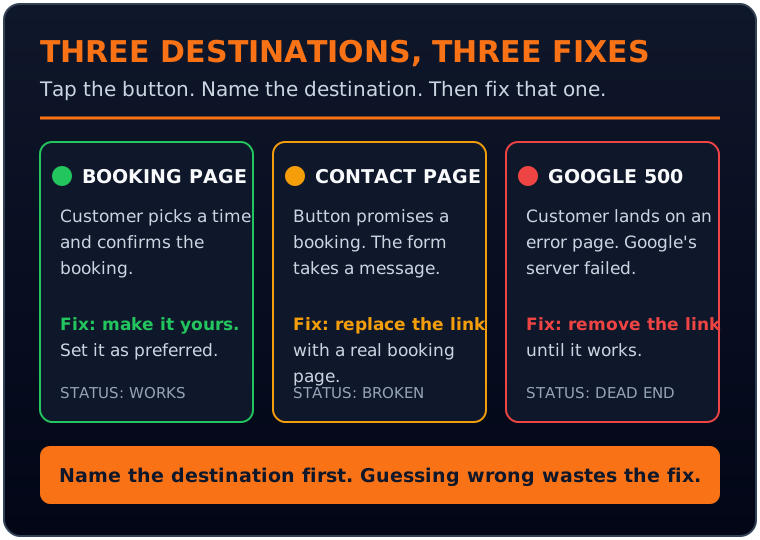
Every Book Online button on a profile leads to one of three destinations. The destination decides the fix, so check it before you change anything. Tap the button on your phone, not on a desktop. Customers book from phones, and the button behaves differently across surfaces. Write down what you see.
The first destination is your own booking page. The button opens a calendar, a scheduler, or a form where a customer picks a time and confirms. This is the good outcome, and it still needs a check.
Confirm the page loads fast on a phone, the times shown are real, and the confirmation actually arrives. A booking page that drops the customer halfway through is a broken button with better manners.
The second destination is your contact page. The button says Book Online and opens a form that asks for a name, an email, and a message. Nobody books anything. They send a note and wait. This is the most common outcome in the reports, because a contact page is the link most businesses already had sitting in the field.
It is also the outcome that breaks Google's own rule. Google's business link policy says local business links must allow customers to complete the designated action. A booking link must let someone book. Its policy also says links must resolve to a working webpage that returns a valid HTTP status code, and it lists the 500 code among the error codes a link must not return.
A button that promises booking and delivers a contact form fails the first rule. A button that delivers a 500 fails the second. Google says links that cannot be crawled by its automated tools may be removed, which means a link like this can disappear on its own, after it has already cost you customers.
The third destination is Google's own maps/reserve page, returning a 500 error. This is the worst outcome and the one you cannot fix directly, because the broken page is not yours. The customer taps Book Online, lands on an error page with Google's name on it, and blames you anyway.
Customers do not sort out whose server failed. They go back to the results and pick the next business.

The customer taps Book Online and lands wherever the link points. That landing page is now part of your business.
Put a name on the destination before you act. Booking page, contact page, or dead page. Three destinations, three fixes, and guessing wrong wastes the effort. A business that replaces a working booking link because it assumed the worst loses a working button. A business that leaves a contact page link in place because the button looks fine keeps a promise it cannot keep.
The Button Test
Run this audit on every profile you manage. Ten minutes per location, once a month, with a named owner for the list. The test has three questions, and each one has a fix attached.
1. Does the button exist? Search your business name on a phone, signed out, the way a customer would. Do it in Google Search and in Google Maps, because the button can show on one and not the other. Note the exact label.
Book Online, Schedule, or Book an appointment are all versions of the same button. If there is no button and you take bookings, that is a finding too. It means the button has not reached you yet, or your category is not in the rollout. Check again next month.
2. Does it work? Tap it. Follow it all the way through to a confirmation screen, or to the point where it asks you to pick a time. Do not stop at the landing page.
A page that loads is not a page that books. Note the full destination address, the load time on a phone, and whether the page shows real availability. Screenshot each step. If the button leads to a 500 error, screenshot that too. You will need it if you have to ask Google or a provider to fix something.
3. Does it belong to you? Open your Business Profile in Google Search while signed in to the account that manages it, and select Booking. Look at the links listed there. One of them may be yours, entered by you.
Another may come from a provider you use, like a scheduling platform. A third may have been added by Google with no provider attached. Google's help page is blunt about the last case: you cannot manually delete third-party booking or reservation providers directly from your Business Profile settings. Removal runs through the provider, and providers are required to process opt-out requests within 5 business days. If the link is still there after that, Google says to report a third-party violation.
Run the test on every location, not just the flagship. Multi-location operators should treat this as a fleet check. One broken button is a lost booking. Ten broken buttons across ten locations is a quiet leak that never shows up in a rank report, because the profile still ranks.
The button is the part that fails. Assign the list to one person, give them the screenshot folder, and put the check on the same monthly cycle as the review replies and the photo refresh. A profile audit that happens once, after a news story, is a reaction. A profile audit that happens monthly is a routine, and routines are what catch the next button Google adds without asking.
This audit is one routine inside profile upkeep. Our Google Business Profile optimization guide covers the rest of the profile, from categories and photos to reviews, so the button check slots into a routine that already exists instead of becoming a one-off chore.

The audit takes ten minutes per location. Do it monthly, on every location, not just the flagship.
The fix ladder
Each destination has its own fix, and they run in order from simplest to slowest.
If the button opens your real booking page, make it yours. In the Booking section of your profile, add your own booking link if it is not already listed, and set it as preferred. Google's help page says that when more than one link shows, you can set a preferred link at the top of your links as Business preferred.
Your own link should sit first, because a link you control is a link you can fix. Check the page it points to once a quarter. Schedulers change their addresses, and a redirect you never noticed is a broken button with a delay.
If the button opens your contact page, replace the link. Add the address of the page where a customer can actually complete a booking, and set it as preferred. Do this even if your booking page is simple. A plain scheduler that works beats a polished contact form that cannot take a booking.
If you have no booking page at all, build one before you leave the button in place. A calendar embed on your site, a scheduler account, or a reservations page all count. What does not count is a form that asks someone to describe what they want and wait for a reply. That is a contact form, and the button above it is lying about what happens next.
If the button opens a Google 500 page, remove the link and wait. You cannot repair Google's page, and leaving a dead button up while you hope the error clears is the worst option of the three. Remove your own link from the Booking Link field if it is yours to remove. If the link came from a provider, send the opt-out request through the provider's link in the Booking section and note the date, because the 5 business day clock starts when you ask.
Check again after the window passes. If the error is gone and the destination works, put a working link back. If the link reappears on its own later, that is a finding worth reporting, because it tells you the button is being added by a process you do not control.
If you take no bookings at all, the button comes off. This is the rule most businesses will resist, because a button feels like a feature. It is not a feature when it leads nowhere.
A restaurant that seats walk-ins, a shop that sells over the counter, or a contractor who quotes by phone has no booking to offer, and a Book Online button on that profile is a promise the business cannot keep. Remove the link. Customers who want you will call, and the call button still works.
One more fix belongs on the list, and it is the one people skip. Tell your team. The person who answers the phone should know the button exists, where it goes, and what to say when a customer calls to say it did not work. A customer who reports a broken button is giving you a gift. Most of them never call. They leave.
Booking is now a default surface
The button did not appear in isolation. It is the third step in a sequence that all points the same way, and the sequence is what makes this post worth writing now instead of next quarter.
The first step landed on November 4, 2026. Google's search product VP, Robby Stein, announced that AI Mode in the United States now includes direct links to research and book home services, through Angi, Thumbtack, Housecall Pro, and Jobber, with ServiceTitan listed as coming soon. Search Engine Journal walked through the terms. Jobber says eligible paid accounts with a complete address and a Business Profile connected at the same address can take AI Mode requests with no lead fee.
Housecall Pro says its users are enrolled at no extra cost. The booking button now appears inside an AI answer, not just on a profile. A wrong link on your profile propagates to a second surface you also did not set up.
The second step is the profile button itself, reported November 9. Booking moved from an opt-in partner setup to something Google fills in when the field has a link, and sometimes when it has nothing at all.
The third step is messaging. On November 6, Google expanded messaging on Google Maps for both Android and iOS, so customers can reach a business from the map without a phone call.
Booking, messaging, and AI answers are converging on the same idea. The profile is becoming a place where a customer completes the transaction, not a signpost that points at your website.
Our earlier post on paid search made the same point from the ads side: AI Mode turned search into a conversation, and the ad surface is now the whole conversation, not the first query. The booking change is the organic twin of that shift. The surface where the customer acts keeps moving closer to Google, and further from your site.
Our earlier post on how paid search split into three surfaces covers the ads half in detail. This is the half you do not pay for, and it is changing just as fast.
There is a fourth step worth watching, even though it is not live in the same way. Google is pushing AI Mode users to connect Gmail, Photos, and Calendar so answers can use their own data, a feature called Personal Intelligence. A local answer that knows the searcher's own bookings and calendar is a different answer for every searcher. A single ranking will not describe what any one person sees.
That change is still rolling out, and it is a proposal in the Local SEO Hat, not a canonical rule. It belongs in this post as a watch item, not as a fact. The direction is plain enough to name. The profile is becoming a transaction layer, and the transaction layer is becoming personal.
Google is not asking whether your profile should take bookings. It is deciding that a profile with no booking option is incomplete, and completing it itself.
That sentence is the whole post in one line. The old question was whether to set up Reserve with Google. The new question is whether the button Google already put up points somewhere useful. The first question was optional. The second one is not.
What a broken button costs
A broken button costs bookings, and it costs them quietly. That is what makes it different from a ranking drop. A ranking drop shows up in a report. A broken button shows up nowhere except in the bookings that never arrive.
Think about the customer. They searched, they found you, they tapped Book Online, and they landed on an error page or a contact form. They did not call to tell you. They went back to the results and picked the next business, the one whose button worked.
You lost a booking you never knew existed, to a competitor you never saw, because of a button you never added. There is no report for that. Google Business Profile performance shows calls, direction requests, and website clicks. It does not show a customer who gave up.
This is the measurement point that matters for local operators, and it is the same rule the Local SEO Hat already states in its canonical form. Judge local visibility by actions and bookings, not by one position. A profile can hold its map pack position and still lose the booking, because the button is the part that converts and the button is the part that broke.
Rank reports will tell you the profile is fine. The booking log will tell you the truth, and only if someone is reading it.
For an agency, the cost multiplies. A client with ten locations and one broken button per location is losing bookings in ten markets at once, and the agency is the one that will get the call when the client notices the phone went quiet. The audit in this post is cheap insurance against that call.
Run it monthly, keep the screenshots, and send the client the list of what you checked. A client who sees the audit trusts the agency that caught the button before the customers did.
The fix is not hard. That is the annoying part. Ten minutes per location, a phone, a screenshot folder, and a monthly reminder. The businesses that lose bookings to this change will not be the ones that could not fix it. They will be the ones that never looked.
Frequently asked questions
Search your business name on a phone, signed out, in Google Search and in Google Maps. Look for a Book Online, Schedule, or Book an appointment button on the profile. Then sign in to the account that manages the profile, open the profile in Search, and select Booking to see every link listed there. A link you do not recognize, or a button with no link you entered, is the one Google or a provider added.
It depends on who added it. A link you entered yourself can be removed from the Booking Link field. A link from a third-party provider cannot be deleted from your profile settings. Google's help page says you cannot manually delete third-party booking or reservation providers directly from your Business Profile settings. Removal runs through the provider's opt-out link, support form, or account portal, and providers are required to process opt-out requests within 5 business days. If the link is still there after that window, Google says to report a third-party violation.
No. Google's business link policy says local business links must allow customers to complete the designated action. A booking link must let someone book. A contact form asks them to send a message and wait, which is not a booking. Replace the link with a page where a customer can pick a time and confirm, and set that link as preferred. If you have no booking page, build one before leaving the button up.
Remove the link and wait. You cannot repair a page on Google's domain, and a dead button costs more than no button. Screenshot the error first, note the date, and check again after a few days. The 500 errors reported on Friday November 6 may have been temporary, since at least one reporter later reached a working page. If the error clears and the destination works, put a working link back. If it comes back, report it through the provider opt-out path or a third-party violation report.
Unknown. The reports so far cover US profiles, and the AI Mode home services booking feature is US-only. Google's policy page notes that some countries and regions are not eligible for certain business links. Search for your business on Google and look. The button either shows or it does not, and that check takes a minute.
Related, not the same. The November 4 announcement added booking and quote links inside AI Mode answers for US home services, through Angi, Thumbtack, Housecall Pro, and Jobber, with ServiceTitan coming soon. The November 9 report is about a Book Online button appearing directly on the Business Profile in Search and Maps, sometimes with no partner involved. The two changes point the same way. Booking is moving into Google's surfaces, and the profile is the place where both of them land.
Monthly, on the same cycle as review replies and photo refreshes. The button can appear or change without notice, and a monthly check catches it before it costs a month of bookings. Multi-location operators should check every location each month and keep a screenshot per location, so a change at one store does not hide inside an average. Run the Button Test this week, on every profile you manage. Note the destination, fix the link, and set a monthly reminder to check again. Google will keep editing the profile. The audit is how you stay ahead of the edits.